Visibility Proof
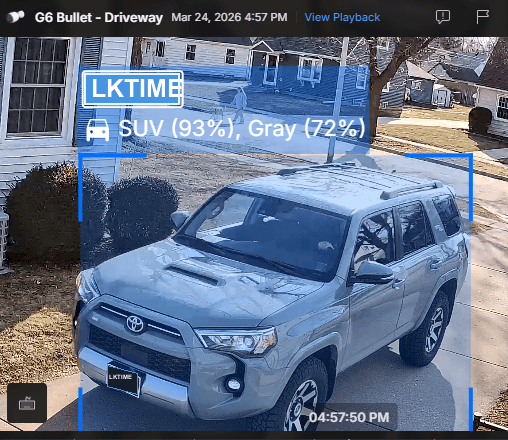
A.I. License Plate Recognition
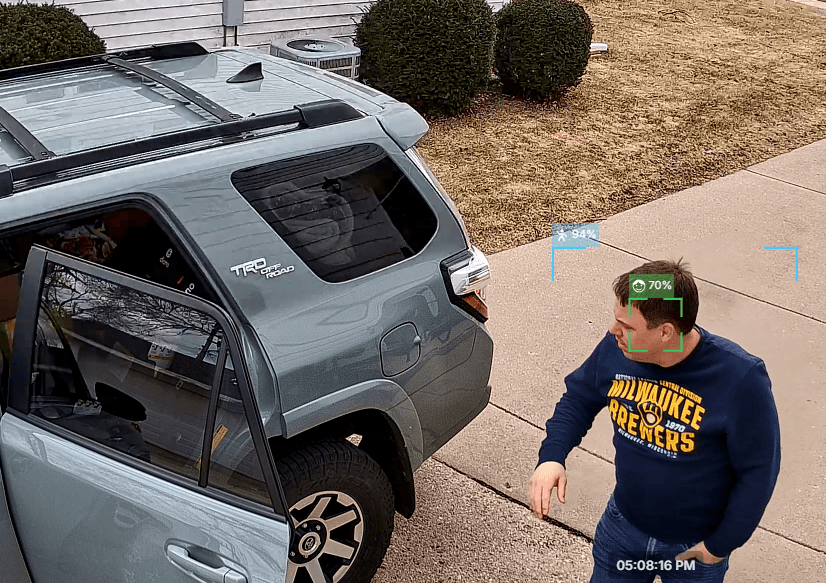
Know who approaches your property. Keep trespassers out.

Internet / Wi-Fi / Cabin Security
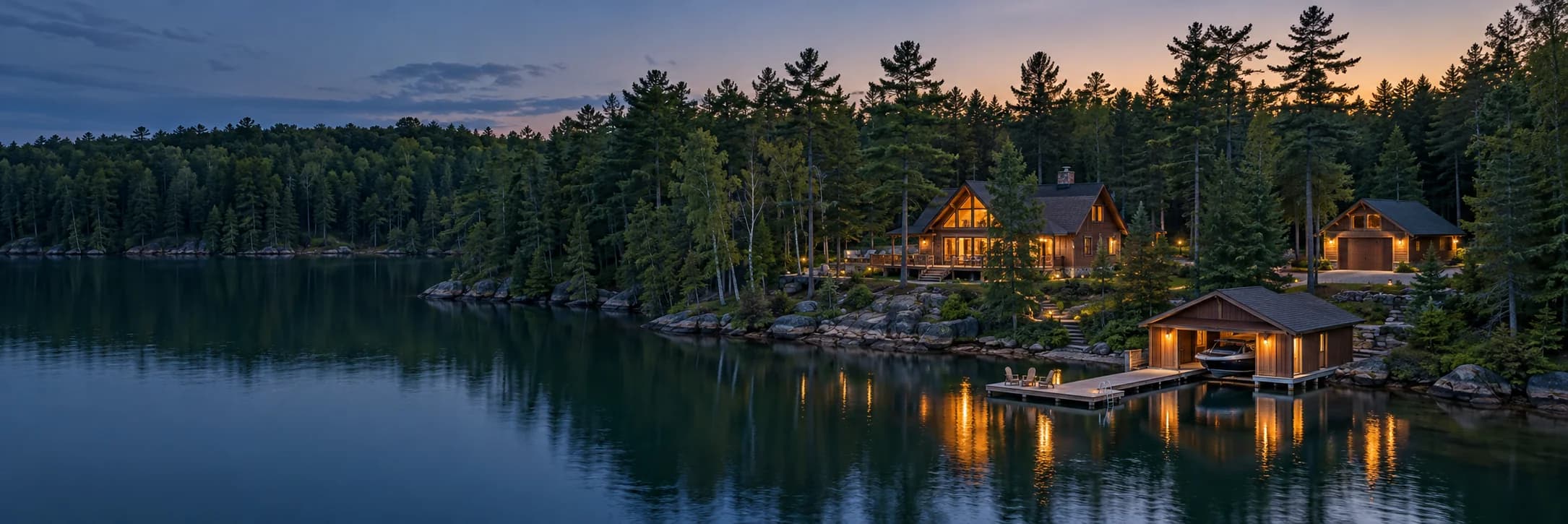
Stay connected to your cabin with dependable internet, strong WiFi coverage, camera visibility, and a clear UniFi equipment path designed for how remote Northwoods properties actually work.

Visibility Proof
A.I. License Plate Recognition
Know who approaches your property. Keep trespassers out.

Visibility Proof
High Quality 4K Event Recording
Facial recognition footage kept locally on your gateway.
Overview
Providers like Spectrum, T-Mobile, and Starlink still deliver internet to your cabin, but their bundled routers are built for basic single-structure homes, not multi-building Northwoods properties. They are not designed to handle hardwired runs, outdoor Wi-Fi coverage, and full camera systems with strong security. We install a dedicated UniFi Gateway to run the network properly, prioritize your devices, and protect traffic coming in and going out.
What This Means for Your Cabin
You Still Use Your Internet Provider - Just Without Their Limitations: We keep your modem, but replace the weak router with a professional-grade system.
Handles Multiple Buildings & Hardwired Runs with Ease: Cabin, garage, guest house - all connected and managed seamlessly.
Built for Cameras, Security & Smart Property Monitoring: Your entire camera system runs smoothly without slowing down your network.
Advanced Network Protection - Incoming & Outgoing: Your gateway actively monitors and protects your data, blocking threats before they reach your property.
Stronger, More Reliable Wi-Fi Across Your Entire Property: No more dead zones, dropped signals, or inconsistent performance.
Full Visibility & Control from Anywhere: Monitor your internet, cameras, and system health right from your phone.
Professionally Configured for Your Property - Not Plug-and-Play Guesswork: Every system is designed, installed, and optimized specifically for your layout.
Clear deliverables, steady local follow-through, and a service shaped around how the cabin is actually used.
Internet setup and optimization
Fiber, cellular, or Starlink planning where appropriate
Property wide WiFi coverage planning
UniFi gateway, switching, and camera-ready system design
Remote management and local follow-through when needed

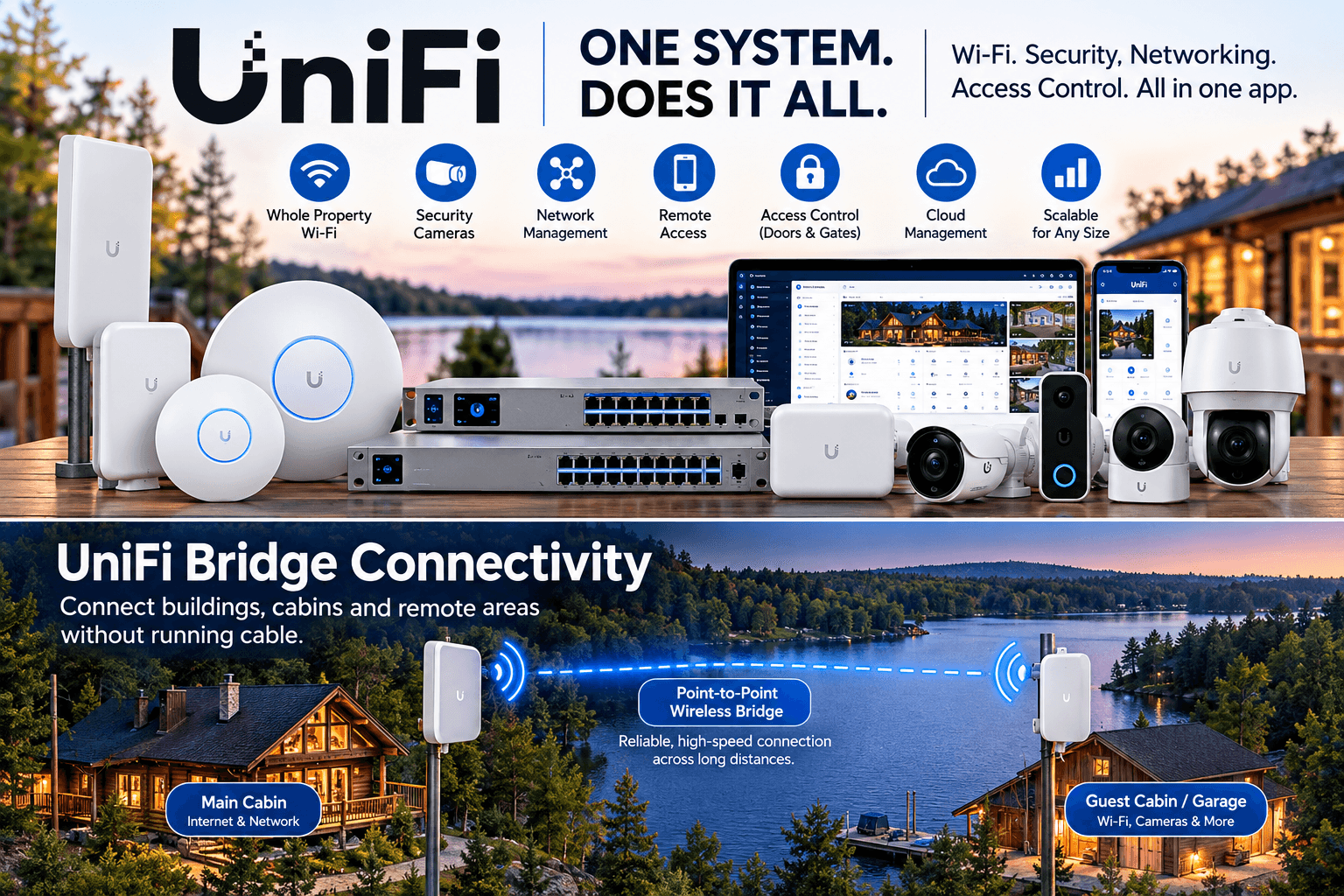
This UniFi system map gives owners a practical view of how internet, WiFi coverage, cameras, and outdoor areas work together across the property.
Why Cabin Internet Is Different
Distance, tree cover, detached buildings, dock areas, and seasonal conditions make cabin connectivity different from a house in town.
The internet source may be fiber, cellular, Starlink, or a combination shaped around what the property can realistically support.
Coverage often needs to reach more than the main cabin, including garages, guest spaces, and important outdoor areas.
If the internet is unstable, cameras and remote monitoring become far less useful when owners are away.
Why It Matters
A dependable connected system gives owners better access before arrival, stronger support for cameras, and more confidence that the property can be checked from anywhere.
Owners can check site conditions before heading north instead of arriving to surprises.
Cameras, alerts, and remote access work better when the underlying internet and WiFi are designed properly.
When paired with caretaker oversight, stronger connectivity supports faster local response to issues that first appear as system alerts.
Camera Visibility
Visibility reduces uncertainty. It helps owners check weather effects, see whether access is clear, confirm activity, and understand what the property looks like before they make the drive north.
See weather and site conditions before arrival.
Confirm visitors, deliveries, or contractor activity.
Stay aware of changes while the cabin is sitting quiet.
Local Response
A camera alert or concerning image is far more useful when there is also a trusted caretaker relationship that can check conditions, document the situation, and help decide the right next step.
Camera reliability depends on good connectivity. That is why Cassian plans internet, Wi-Fi, camera placement, recording, and monitoring as one system instead of separate projects.
Package Details
The goal is not to assemble a pile of retail hardware. The goal is to build a cabin system that is stable, expandable, and worth trusting when you are not there.
Small Home / Cabin
Best for a compact home, cabin, or second property with a few cameras and a simple coverage plan.
Total Cost Installed
$2,650.00
Includes installation for the package path shown here.
Gateway
1 - Cloud Gateway Max with 512 GB onboard storage
Switching
1 - Switch Ultra 210W
WiFi
2 - U7 Pro or U7 Pro Wall access points
Cameras
2 - G6 Turret Ultra or G6 Dome Ultra cameras, plus optional G4 Doorbell Pro PoE Kit
Recording
Start with 512 GB for event-only recording. Step up to a larger SSD when you want longer retention or more continuous recording.
This is the default Cassian recommendation for smaller applications.
It keeps the system compact while still giving local UniFi Protect recording.
A larger SSD is the upgrade path when event-only recording is no longer enough.
Mid-Size Home / Detached Garage
Best for a home with broader coverage needs, an outbuilding, or more exterior views.
Total Cost Installed
$3,550.00
Includes installation for the package path shown here.
Gateway
1 - Cloud Gateway Max with 512 GB onboard storage
Switching
2 - Switch Ultra 210W
WiFi
2 - U7 Pro or U7 Pro Wall access points
Cameras
4 - G6 Turret Ultra or G6 Dome Ultra cameras, plus optional G4 Doorbell Pro PoE Kit
Recording
Start with 512 GB for event-only recording. Step up to a larger SSD when you want longer retention or more continuous recording.
This is where endpoint count usually starts to drive switch selection.
It is also where outdoor WiFi and detached-building links become part of the same plan.
Use bullet cameras only where the lot and viewing distance justify the higher detail.
Large Home / Camera-Heavy System
Best for larger homes requiring more cameras, more PoE load, and clearer growth headroom.
Typical Equipment Budget
Custom Quote Required
Before labor, cabling, mounts, and project-specific install conditions.
Gateway
Dream Machine Special Edition
Switching
Built-in PoE switching plus Switch Ultra 210W or Switch Flex 2.5G PoE as the system grows
WiFi
Multiple U7 Pro, U7 Pro Wall, and U7 Outdoor access points based on floorplan and exterior needs
Cameras
Six-plus cameras with G6 Bullet used for long views and doorbell integrated at the front entry
Recording
Use Dream Machine SE as the main console and add UNVR when the recording load or retention target gets serious.
This is the main upgrade path for larger homes with more cameras.
Dream Machine SE gives more routing, PoE, and expansion headroom than the compact gateway tier.
Once continuous recording across many cameras becomes the priority, UNVR is the cleaner long-term recorder.
Digital Monitoring
Digital Monitoring keeps the network and camera infrastructure from going dark between visits. Instead of waiting to discover a failed camera, unstable connection, or security update issue, the system stays under active professional oversight year round.
The $39 monthly Digital Monitoring fee is included in all Camera and WiFi packages.
Continuous oversight of your Starlink or fiber connection protects the foundation of the system.
Real-time health monitoring for UniFi G6 cameras confirms they stay online, recording, and operating properly.
Remote firmware and security updates help keep the network protected against evolving threats.
Critical alerts route to your phone, with simultaneous technical notifications to Cassian.
Remote resolution handles many glitches before they require a paid service call.
When paired with a caretaking package, Digital Monitoring supports faster response to property issues that first appear through alerts, camera visibility, or connectivity failures.
Doorbell Privacy
Unlike Ring or Blink, your recordings do not have to live in somebody else's subscription ecosystem just to remain accessible.
Property Wide Coverage
Cassian plans WiFi around how owners actually use their cabin, whether that means coverage through the main structure, to an outbuilding, or toward key outdoor areas.
Better distribution inside the cabin for daily use and remote access.
Cleaner support for detached buildings, guest areas, and approach points.
A more useful foundation for cameras, alerts, and future expansion.
Related Visibility
Security cameras, remote check-ins, and off-site visibility all depend on dependable connectivity. That is why Cassian treats internet, WiFi, and UniFi system design as one conversation instead of separate projects.
When UniFi hardware is recommended, equipment is quoted at current UniFi store pricing without markup. Project pricing separately covers design, installation, cabling, and support.
UniFi System Planning
The right flow is internet handoff, then gateway, then switching, then WiFi, then cameras, then recording. That keeps the system easier to size, easier to expand, and less likely to hide weak links inside the install.
Pricing Note
UniFi hardware is not marked up above current UniFi store pricing. Cassian quotes equipment separately from design, installation, cabling, mounting, and ongoing service.
Cloud Gateway Max is the gateway Cassian uses for smaller applications. The 512 GB baseline is positioned for event-only recording. When the owner wants longer retention or more continuous recording, the system should move to larger storage.
Equipment examples reflect the current UniFi US store lineup reviewed on March 25, 2026.
Equipment Hierarchy
This is the order Cassian uses to explain a residential UniFi build, from internet handoff through storage and camera retention.
1. Internet handoff
Everything downstream depends on a stable handoff and clean modem or bridge configuration.
2. Gateway / console
Cassian uses Cloud Gateway Max for smaller homes and Dream Machine SE for larger homes with more cameras.
3. PoE switching
Choose switch size by camera count, access point count, and whether you need 2.5 GbE uplinks.
4. WiFi coverage
Main floor, upper level, detached garage, patio, and dock-side coverage usually need different AP placement.
5. Cameras and doorbell
Turret, dome, bullet, and doorbell choices depend on sight lines, aesthetics, and weather exposure.
6. Recording and retention
Cloud Gateway Max with 512 GB is the default smaller-home recorder. Larger storage is the move when retention or continuous recording matters.
Curated Equipment
This keeps the page concrete without turning it into a live storefront. Use these as examples of what belongs in each tier, not as a fixed quote.

UCG-Max
Compact 2.5G cloud gateway with UniFi Protect support and selectable storage.
Best Use
Best for smaller homes, 2 to 6 cameras, and one to three access points.
Budget Role
Typical choice in entry-to-mid residential equipment budgets.

UDM-SE (180W)
10G cloud gateway with built-in PoE switching and stronger large-site headroom.
Best Use
Best for larger homes, heavier camera counts, and systems likely to expand.
Budget Role
Common step-up choice once the home grows beyond a compact gateway layout.

UNVR
Dedicated recorder with four drive bays for longer retention.
Best Use
Adds clean recording headroom when a larger Dream Machine SE system needs more camera storage.
Budget Role
Usually enters the plan only when camera count or retention goals justify it.

USW-Lite-8-PoE (52W)
Silent fanless 8-port PoE switch.
Best Use
A straightforward fit for a small home with a couple of APs and a few cameras.
Budget Role
A practical small-system switch without overbuilding the install.

USW-Ultra-60W (52W)
Compact 8-port GbE PoE switch with flexible mounting.
Best Use
Works well in structured wiring panels, utility rooms, and smaller residential expansions.
Budget Role
Often the cleaner move when more PoE flexibility is needed in a compact install.

USW-Ultra-210W (202W)
Higher-power compact PoE switch for larger endpoint counts.
Best Use
A strong match when camera count climbs and multiple APs need power from one location.
Budget Role
Frequently the right move in better and best residential builds.

USW-Flex-2.5G-8-PoE (196W)
8-port 2.5 GbE PoE++ switch with 10 GbE uplink support.
Best Use
Useful when you want faster uplinks to WiFi 7 APs or a more premium residential backbone.
Budget Role
Premium backbone choice when faster WiFi uplinks matter.

U7-Pro
Ceiling-mounted WiFi 7 AP for main living areas.
Best Use
The default indoor AP for most homes using Cloud Gateway Max or Dream Machine SE.
Budget Role
A common default AP in most current residential UniFi recommendations.

U7-Pro-Wall
Wall-mounted WiFi 7 AP suited to finished spaces and cleaner visible installs.
Best Use
Good for bedrooms, hallways, or remodels where ceiling placement is not ideal.
Budget Role
Useful when clean visible placement matters more than ceiling mounting.

U7-IW
In-wall AP with an integrated 2.5 GbE PoE switch.
Best Use
Useful in guest rooms, offices, and small secondary wings that benefit from local wired ports.
Budget Role
Good add-on choice where one AP can also solve local wired connectivity.

U7-Outdoor
All-weather WiFi 7 AP for patio, yard, and outbuilding coverage.
Best Use
Use when the home needs coverage beyond the interior shell.
Budget Role
Common outdoor WiFi upgrade once the property extends beyond the home itself.

U7-Mesh
Compact indoor/outdoor WiFi 7 AP with an integrated long-range antenna system.
Best Use
A strong fit for patios, exterior walls, guest houses, and installs where a mesh-style form factor works better than a flat AP.
Budget Role
A clean higher-end mesh-style option for outdoor and detached coverage.

U6-Mesh
Sleek indoor/outdoor WiFi 6 AP with 6 spatial streams designed for mesh applications.
Best Use
A good lower-cost outdoor or detached-space option when WiFi 6 is enough and you want the same clean mesh-style format.
Budget Role
A value-minded outdoor coverage choice when WiFi 7 is not necessary.

UVC-G5-Turret-Ultra
Compact weatherproof 2K PoE camera with strong low-profile placement options.
Best Use
Great for soffits, front corners, driveway coverage, and everyday residential exterior views.
Budget Role
A strong default exterior camera for many small and mid-size homes.

UVC-G5-Dome-Ultra
Tamper-resistant 2K dome for indoor or more protected placements.
Best Use
Fits entries, mudrooms, garages, and interior choke points.
Budget Role
Commonly used where a lower-profile interior or protected camera is preferred.

UVC-G6-Bullet
4K PoE bullet with stronger detail and AI-assisted detection.
Best Use
Use where plates, long driveways, or wider lots need more image detail.
Budget Role
Usually reserved for the views that justify a stronger camera.

UVC-G4 Doorbell Pro PoE Kit
Premium UniFi doorbell with PoE and included chime.
Best Use
The cleanest front-door option when the entry can be hardwired.
Budget Role
Premium front-entry choice in better and best systems.

UVC-Doorbell-B
Compact PoE video doorbell with two-way audio and versatile mounting options.
Best Use
A simpler lower-cost entry-door option when you want UniFi doorbell coverage without stepping up to the G4 Doorbell Pro PoE Kit.
Budget Role
Good value option when the front door needs UniFi coverage without premium add-ons.
Next Step
Cassian can narrow this combined guide to your cabin, your internet source, your desired coverage, and the number of cameras you actually need.
Connected Cabin
If your cabin internet is unstable, coverage is inconsistent, or you want one clear plan for WiFi, cameras, monitoring, and future UniFi upgrades, start with a consultation shaped around the property and how you use it.
UniFi hardware is not marked up above current UniFi store pricing. Quotes separate equipment from design, installation, cabling, and service.